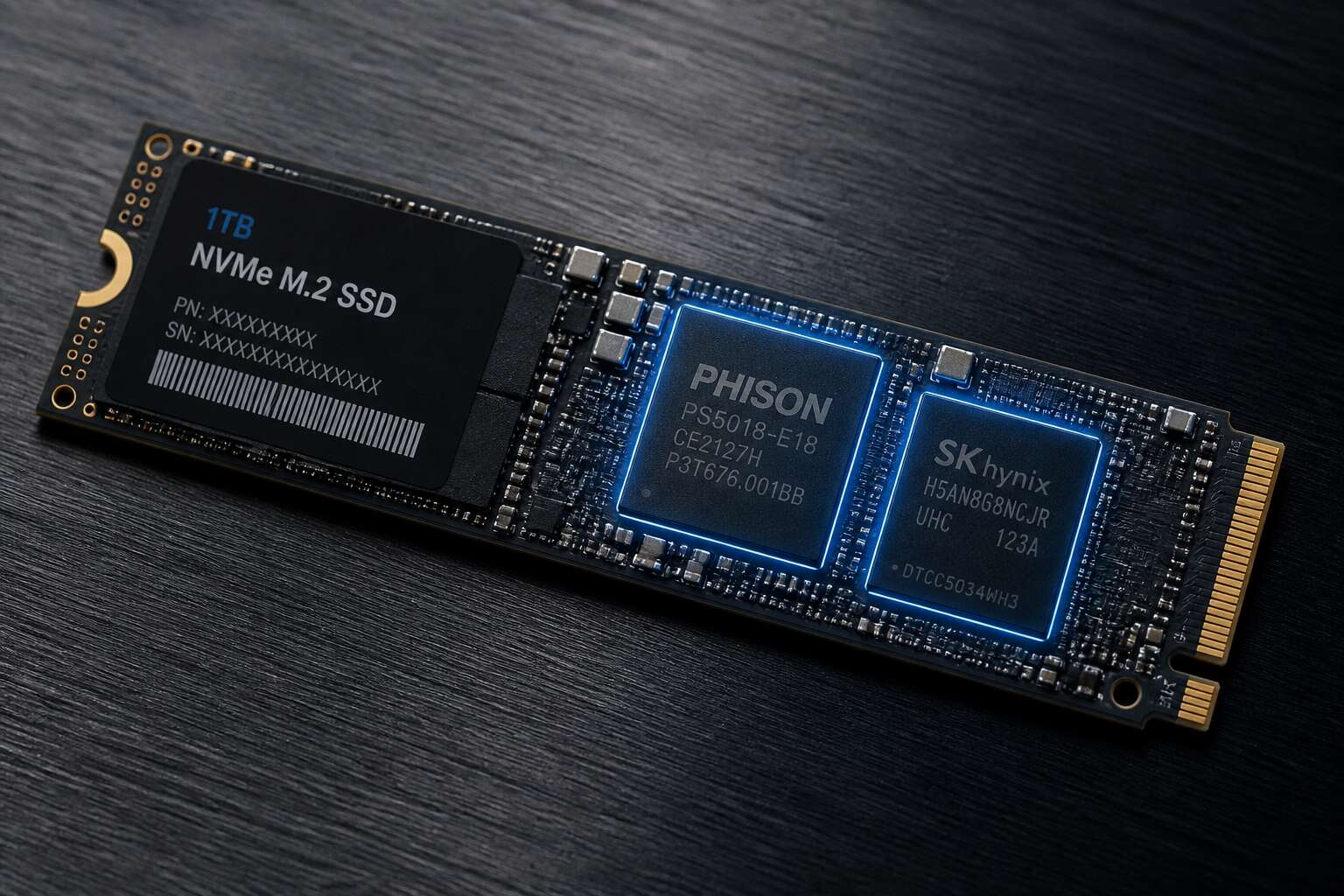
Understanding the Role of DRAM in NVMe SSDs
What DRAM Does in an SSD Controller
Most shoppers ask which NVMe SSD has DRAM because that component determines how well the drive handles random I/O. In an SSD controller, DRAM acts as a staging area for the flash translation layer, keeping address maps readily accessible. This speeds up reads and writes, especially under heavy multitasking.
Budget drives often skip DRAM and rely on the host system’s memory instead. Called host memory buffer, this works for basic use but sustained performance can dip. The controller then fetches mapping data repeatedly from NAND, adding latency.
- DRAM stores the mapping tables for quick retrieval.
- DRAM buffers incoming writes before they hit NAND.
- DRAM helps maintain consistent speeds during large transfers.
If you are comparing models, check the spec sheet for a cache buffer chip. The answer to which NVMe SSD has DRAM usually points to premium drives, though a few midrange options include it as a selling point.
Why DRAM Matters for Performance and Endurance
Picture this: you have just unboxed a brand-new drive for your gaming rig in Johannesburg, and the load times are… underwhelming. The culprit might be a missing DRAM cache. The question of which NVMe SSD has DRAM is more than a spec-sheet flex; it is the deciding factor between a snappy system and one that stutters during file transfers. While many budget drives cut corners by using your system’s RAM instead, a dedicated cache keeps things moving.
Without that physical memory chip on the board, the drive has to scavenge for mapping data on the NAND itself. This repeated fetch operation adds latency. For everyday office work in Cape Town, you might not notice the difference. But for 4K video editing or large database queries, sustained write speeds can drop to a crawl. Knowing which NVMe SSD has DRAM ensures your drive does not become a bottleneck when you need peak performance during a heavy render or an intense gaming session.
So, how do you spot the right component? You will want to look for drives that advertise a “DRAM buffer” or “cache memory” explicitly in their specifications. Typically, you will find this feature in premium tiers like the Samsung 980 Pro or the WD Black SN850. On the other hand, many value-focused models from Crucial and Kingston often rely on the host memory buffer (HMB) scheme to keep costs low.
- Check the product page for a separate “Cache Memory” or “DRAM” specification.
- Look for the physical component in review teardowns if you are uncertain.
- Expect that the answer to which NVMe SSD has DRAM will usually point to higher-priced units.
Endurance also takes a hit on DRAM-less models. Because the controller needs to erase and rewrite mapping tables constantly to the NAND flash, it introduces a higher write amplification factor. This can wear out the cells faster over time. A drive with a dedicated cache reduces those unnecessary writes. When you consider that your data’s longevity is on the line, the extra few hundred Rand for a model with actual memory chips starts to look like sensible insurance. Don’t let a tempting sale price lure you into a slow, short-lived drive; check the specs before you buy.
DRAM Caching vs. Host Memory Buffer Technology
Consider the path of your data during a heavy workload. It is a negotiation between speed and persistence. DRAM caching is like having a highly organised assistant with a perfect memory of every file’s exact location on the shelf.
Host Memory Buffer technology, or HMB, is a leaner approach. Instead of a dedicated physical memory chip, the controller borrows a slice of the system’s main memory. This reduces cost but leans heavily on the CPU and system resources to manage mapping tables. It is efficient for typical use, yet it introduces variable latency under load.
- DRAM: Fast on-board mapping
- HMB: Shared system memory
The real question of which NVMe SSD has DRAM often resolves around performance consistency, while HMB offers an economic alternative for lighter tasks.
Common Misconceptions About SSD DRAM
Shopping for a solid state drive in South Africa can feel like detective work, especially when you are confronted with the cold boot times of a drive that hides its deficiencies during a review cycle. The question of which nvme ssd has dram is often the difference between smooth multitasking and frustrating stutters on your PC.
Your computer’s memory allocation is the foundation; DRAM acts as the traffic cop for your data, holding the mapping tables that tell the controller where everything lives. Without this dedicated memory, the drive must constantly fetch the map from the slower NAND flash, adding latency.
How to Identify DRAM-Equipped NVMe SSDs
Check the Official Specification Sheet
Every NVMe drive promises blistering speed, yet the reality of sustained performance varies wildly. A critical component often separates the champions from the pretenders: the onboard DRAM cache. Knowing which NVMe SSD has DRAM is the difference between a system that stays fluid under heavy load and one that stutters when the cache runs dry. DRAM acts as a high-speed staging ground for the drive’s mapping tables, allowing for rapid access to data locations.
Without it, the SSD must rely on slower system memory (HMB) or direct flash reads, which bottlenecks random write performance. Your first port of call should always be the official specification sheet, not the marketing blurb on the box. Manufacturers are often cryptic, but the truth is buried in the fine print.
Here is how to decode that document:
– Look for explicit mentions of “DRAM cache size” or “embedded DRAM” in the technical specs.
– Check for a dedicated “Cache” or “Memory” section, which typically lists either LPDDR4 or DDR3/DDR4 chips.
– Be wary of terms like “Host Memory Buffer” or “HMB”, which signal a DRAM-less design that borrows from your PC’s RAM.
– Ignore “SLC caching” figures; this is a temporary write buffer in the NAND itself, not the permanent DRAM.
For example, the Samsung 990 PRO lists 1GB of DDR4 DRAM for every 1TB of storage. In contrast, a drive like the Crucial P3 Plus simply states “HMB” support, confirming it lacks dedicated DRAM. Once you master this reading, you will never be misled by the label again.
Look for Host Memory Buffer in thae Description
The search for which NVMe SSD has DRAM ends with a single abbreviation. When a manufacturer promotes Host Memory Buffer support, they admit the drive lacks cache memory. Product descriptions rarely scream about missing hardware, but they leave a trace.
Manufacturers know that most buyers scan for capacity and speed figures. HMB gets mentioned, sometimes proudly, as a power-saving feature. Yet the implication is clear: this drive borrows system memory instead of carrying dedicated DRAM. Any SSD listing HMB cannot be your answer to which NVMe SSD has DRAM.
- HMB in the description means no dedicated DRAM
- Missing memory specs usually point the same way
This narrows the field. Eliminate drives that mention HMB; the rest merit scrutiny. Specification sheets that list cache memory sizes hold the answers. The description rewards a second reading. The first pass shows what they want you to see. The second shows what they omit.
Use Online SSD Databases and Models
A single database entry can answer the question in seconds. Online SSD databases end the search for which nvme ssd has dram with precision. Resources like the Newmaxx spreadsheet and the SSD Master list catalog controller specifications, NAND layout, and cache architecture for hundreds of models. They compile data from manufacturer datasheets and teardown photographs. You can filter by controller family or search a specific model number to see whether it includes a DRAM chip.
Cross referencing a database with the official specification sheet gives the most reliable answer. A database entry that lists cache memory size confirms the drive carries dedicated DRAM. An entry that mentions Host Memory Buffer suggests the opposite.
- Look for cache size in the controller details
- Check teardown images for a visible DRAM package
- Compare the same model across multiple databases
This method works well for identifying which nvme ssd has dram because databases update faster than product pages. Model revisions change memory configurations too. A drive that shipped with DRAM in its first revision may arrive without it later.
Understand Controller Architecture Indicators
How to identify DRAM-equipped NVMe SSDs without cracking open a forensic lab? Examine the controller’s architecture. A dedicated DRAM die requires a memory interface, which is a physical set of traces to a chip that is not the NAND. If you see a small package labelled LPDDR4 or similar, you have found your culprit. Here is a quick field test:
- Locate the controller’s part number, often etched directly on the silicon.
- Search for its datasheet and look for “Dynamic RAM Interface” under the memory specifications.
Beware of integrated SRAM, which hides on the controller itself. The burning question of which nvme ssd has dram usually resolves once you check the pin count. A 32-bit or 64-bit ECC bus requires physical pins. Those pins have to connect to something. If nothing is soldered down, the drive relies on Host Memory Buffer, which we have already covered.
Read Teardown Reviews and Benchmarks
Teardown reviews cut through marketing language. A reputable reviewer will remove the label and photograph the PCB. You can see the DRAM package next to the controller with your own eyes. That visual proof answers which nvme ssd has dram faster than any specification sheet. Tech sites like Tom’s Hardware and ServeTheHome regularly publish such teardowns for new drives.
Benchmarks also reveal the presence of DRAM, though indirectly. A drive relying on Host Memory Buffer will show inconsistent performance on random reads after sustained load. DRAM-equipped drives maintain their queue depth performance because the controller has dedicated memory to process incoming commands.
When scanning reviews, look for specific evidence:
- Physical PCB photographs with labelled components
- Sustained random write tests beyond the SLC cache
- Power consumption measurements during idle states
That combination of teardown imagery and benchmark data tells you more than any official brochure, especially when you are trying to establish which nvme ssd has dram before spending your rands.
Top NVMe SSD Categories with DRAM: Market Comparison
Performance Drives for Enthusiasts
The market for enthusiast storage has evolved into a stratified landscape where the difference between a good drive and a great one often comes down to a single component. When you ask which nvme ssd has dram, the answer separates the premium tier from the budget crowd. Top tier drives like the Samsung 990 Pro and the WD Black SN850X are unequivocal about their hardware buffers, using them to maintain extreme consistency during heavy write workloads.
To make the choice clearer, here is a breakdown of the current elite performers in the arena:
– Samsung 990 Pro: Uses a proprietary in-house controller with DDR4 DRAM for sustained transfer rates.
– WD Black SN850X: Features a dedicated DRAM cache to handle massive file transfers without choking.
– Seagate FireCuda 530: Employs a custom E18 controller paired with a large DDR4 buffer.
– Solidigm P44 Pro: A highly efficient design that leverages DRAM to keep random read times incredibly low.
These drives command a premium because their controllers are built differently. The controller architecture dictates how the DRAM is utilized for mapping tables, and the difference is tangible when you push large video files or compile code. While DRAMless drives with Host Memory Buffer are acceptable for light use, the performance hits a wall under sustained load. The endurance rating in terabytes written often does not reflect this performance drop, so you must look beyond the specification sheet to see how many are thoroughly tested. The consistency offered by a hardware buffer is why enthusiasts still pay for it even as other technologies emerge.
Professional and Content Creation Drives
Some drives treat DRAM like a secret handshake. If you ask which nvme ssd has dram in the professional sphere, the answer separates the tools from the toys. For content creators, the stakes are higher than raw frame rates. A crash during a 4K render, or a stutter while scrubbing a timeline, costs real money. The question of which nvme ssd has dram matters here because your workflow depends on consistent, predictable performance.
Creative professionals need drives that handle massive files and sustained writes without throttling. This crowd often looks beyond the flagship gaming models, though those still perform admirably. The focus shifts to endurance and sustained throughput over burst speeds. A drive that hits 7,000 MB/s for five seconds then drops to 1,000 MB/s is useless for video editing. You need a constant, reliable stream of data.
Here is how the professional tier breaks down for creative workloads:
1. Kingston KC3000: Uses a Phison E18 controller with a dedicated DRAM buffer, excellent for large RAW photo libraries and 8K video editing.
2. Crucial T500: Features a DRAM cache that balances power consumption with high sustained write speeds, ideal for laptops used on location.
3. Sabrent Rocket 4 Plus: A workhorse with a substantial DRAM cache, designed for continuous heavy write operations like exporting long-form video.
These models use DRAM to maintain a stable mapping of your data. When you are working with a 200GB video project, the controller relies on that buffer to find files quickly and keep writing without error. A DRAMless drive would falter, using the Host Memory Buffer to borrow system RAM, which introduces latency and potential bottlenecks.
The price difference is often justified by the sheer volume of work a professional can push through these drives. They are built to withstand a petabyte hammer, not just a weekend gaming session. I have seen editors burn through a 2TB drive in a single project, and the DRAM-equipped models never flinch. The endurance ratings look similar on paper, but the real-world behaviour under a torrent of data is where the hardware buffer proves its worth. So when you question which nvme ssd has dram for your studio build, choose one that treats your data with the respect it deserves.
Gaming and High-End Consumer Drives
When building a high-performance PC in South Africa, one question keeps surfacing: which NVMe SSD has DRAM? The answer often separates a responsive system from one that stutters under pressure.
For gaming and high-end consumer drives, the focus is on sustained performance and consistent frame times. These SSDs typically use a DRAM cache to store the mapping table, which is a critical piece of the puzzle.
- Samsung 990 Pro: A top-tier option with a dedicated DRAM buffer, ensuring low latency and stable 4K random read/write speeds.
- WD Black SN850X: Known for its impressive sequential speeds and robust DRAM cache, making it a favourite for large game libraries.
- Seagate FireCuda 530: Offers high endurance and excellent sustained write performance, backed by a healthy DRAM allocation.
These premium drives rely on controllers like the Elpis or the Phison E18, which are designed to manage the DRAM efficiently. They shine during long gaming sessions or when transferring massive video files. While a DRAM-less drive might offer a lower upfront cost, the potential for performance drops is real.
The best answer to which NVMe SSD has DRAM in this category is to look for the top-tier models from reputable brands. You are paying for that buffer, and it directly translates to a faster, more reliable experience.
DRAM-less vs. DRAM-Equipped NVMe SSD: Trade-Offs
Boot Time and Application Loading
Exactly how much time do you actually save with a DRAM-equipped drive? Reports from storage review sites routinely show a 1 to 3 second difference in cold boot times. For a system that takes 15 seconds to start, that feels almost negligible. However, the real story unfolds during heavy file transfers and game level loads, where the controller must manage a complex mapping table without a dedicated cache. When a DRAM-less SSD relies on the Host Memory Buffer (HMB), it borrows a small slice of your system RAM. This works well, but it creates a shared resource bottleneck that can introduce stutter during multitasking. The balance of speed versus cost becomes a real puzzle.
For daily use, the distinction matters less than the marketing suggests. A model equipped with the Phison E21T controller demonstrates that a solid HMB implementation can close the gap to roughly 90% of the performance of a full DRAM design.
Here are a few observable trade-offs:
– Boot time differences are often under three seconds for most users.
– Sustained write speeds after the cache fills drop significantly on HMB models.
– Thermal output tends to be lower on DRAM-less drives, which helps slim laptops.
– The cost per gigabyte is usually friendlier for budget builds.
The missing piece is consistency under load. While a DRAM-equipped drive maintains a stable random read speed during a game texture stream, a DRAM-less unit may falter when the system memory is under pressure. This is why the question of which nvme ssd has dram often leads buyers to pay a slight premium for the former. As file sizes inflate with new game engines, the gap between a quick load time and a seamless experience becomes more distinct. The choice ultimately boils down to your tolerance for minor hitches against a lower price tagcars
Sustained Write Performance and Caching
The final moments of a large file transfer often expose the real difference. A DRAM-equipped drive keeps its mapping table resident, so sustained write speeds stay elevated even as the SLC cache fills. A DRAM-less model, in contrast, must pause and reorganize data on the fly, causing the write speed to plummet. This behavior is not a defect. It is the result of the controller lacking a dedicated workspace to track data locations.
For professionals moving large video or database files, that drop is significant. For a student saving assignments or a gamer downloading titles, the impact is less noticeable. The HMB approach borrowed from system memory works well when your RAM is plentiful and idle. Yet, when memory pressure rises, the SSD competes with your applications for the same resource.
Here is how the trade-off typically presents itself:
– Sustained writes can drop by more than half on DRAM-less models after the cache is exhausted.
– DRAM-equipped drives maintain a more predictable speed curve during prolonged operations.
– Small file random writes often suffer more than sequential transfers on HMB units.
The question of which nvme ssd has dram becomes critical during heavy workloads. A drive with DRAM offers a consistent experience and a stable response curve. A drive without it offers a lower price and reduced power draw. The sustained write performance and caching strategy of each determines how it behaves under stress. Knowing your workload helps you decide where to spend your money.
Random IOPS and Latency Under Load
The difference between a DRAM-equipped NVMe drive and a DRAM-less model becomes stark when you push random input/output operations per second (IOPS) under sustained load. Random 4K reads and writes are the true test of a controller’s efficiency. A drive with a dedicated DRAM cache can map and access data with far lower latency because the flash translation layer (FTL) resides in fast memory. A DRAM-less drive must constantly read and update its mapping table from slower NAND flash itself, creating a bottleneck that shows up immediately in heavy multi-threaded workloads.
Under load, the latency figures tell the story. A DRAM-less drive might deliver respectable numbers in a light desktop scenario, where the system can use host memory buffer (HMB) technology to borrow a small portion of system RAM. But when that system RAM is already under pressure from games, video editing, or database queries, the borrowed buffer shrinks. The drive then has to perform flash reads just to locate data before it can even service your request. That adds microseconds of delay per operation, and in a queue depth of 32 or higher, those microseconds compound into noticeable stutters and sluggish responsiveness.
To determine which NVMe SSD has DRAM, you can look at the controller specifications or the drive’s teardown. Many budget drives use controllers like the Phison PS5013 or Silicon Motion SM2263XT, both of which are designed without DRAM. In contrast, higher-end options such as the Samsung 980 Pro, WD Black SN850, and Seagate FireCuda 530 all include dedicated DRAM chips. You can also check the product page for terms like “DRAM cache” or “low-power DDR4” mentioned in the specifications. Some manufacturers are transparent, while others omit this detail, so third-party reviews that include PCB photos are often the most reliable source.
The impact on random IOPS is measurable. A DRAM-equipped drive might sustain 800,000 random read IOPS, while a DRAM-less counterpart drops to 300,000 or lower once the SLC cache fills and HMB is exhausted. For sequential transfers, the gap narrows because NAND raw throughput dominates. But for random workloads, the DRAM presence is the single most influential factor in maintaining consistent latency. If your usage involves virtual machines, code compilation, or file servers with many concurrent users, the choice becomes obvious. For everyday browsing and document editing, the difference rarely rises to the level of perception.
One way to spot the difference without opening your drive is to monitor sustained write performance after the cache fills. DRAM-less drives often show a dramatic cliff, where write speeds plummet by 70 percent or more. DRAM-equipped drives exhibit a more gradual decline because the controller can efficiently manage garbage collection and wear leveling with its dedicated memory. The random write performance, in particular, benefits from having a staging area for incoming data before it is committed to NAND.
– Check the controller model in the drive’s specifications
– Look for explicit mention of DRAM or LPDDR4 in technical datasheets
– Read professional reviews that include PCB imagery and component listings
– Compare sustained random write benchmarks at queue depths of 1 and 32
When you ask which NVMe SSD has DRAM, the answer often correlates directly with price and intended use case. Budget drives that come in at under R1,000 for a 1TB model almost certainly lack DRAM. Drives in the R1,500 to R2,500 range from reputable brands typically include it. The trade-off in random IOPS and latency under load is the reason for the price gap. If you are building a system for content creation or running a database server, the extra cost is justified. If you are upgrading an older laptop for general productivity, a DRAM-less drive with HMB may serve you adequately, provided your system has at least 16GB of RAM.
Power Consumption and Heat Generation
Power draw and heat generation often separate premium storage from value alternatives. A DRAM-equipped drive uses additional power for the cache chip, but this investment pays dividends under sustained workloads. The DRAM enables the controller to batch operations efficiently, reducing the number of small, energy-hungry NAND writes. In contrast, a DRAM-less model compensates by leaning on the system’s HMB, which shifts memory management duties to the CPU. This approach can increase overall platform power consumption during heavy file transfers, and the controller may run hotter as it constantly retrieves mapping data from slower flash.
Understanding which nvme ssd has dram becomes a thermal calculation. Running a demanding application can push a DRAM-less drive to higher sustained temperatures, which might exceed nominal cooling solutions in compact laptops. An efficient DRAM design leads to lower operational temparatures and steadier performace. Longer write sessions also trigger thermal throttling sooner on budget models, reducing transfer speeds to protect components. This heat buildup can affect not only the drive’s lifespan but also the performance of adjacent hardware. While the raw power difference is measured in watts, the real-world impact manifests in system stability and long-term reliability, making the choice a matter of efficiency for users who push their hardware.
Recommendations by Use Case for NVMe SSDs with DRAM
Budget Builds: When DRAM-less Is Acceptable
Gaming Rigs: Better Pick Drives with DRAM
For a gaming rig, the answer to which nvme ssd has dram is almost always the one you should buy. Games load massive texture files and shader packs, demanding rapid random reads. A drive with a dedicated DRAM cache, like the Samsung 990 Pro or WD Black SN850X, handles these scattered data requests without breaking a sweat.
These drives maintain a full map of the NAND flash, letting the controller find any file instantly. The difference is tangible in open-world titles where assets stream continuously. You get consistent frame pacing and zero hitches, even when the drive is under heavy load.
- Samsung 990 Pro: Features a fast LPDDR4 cache, excellent for sustained workloads and intense gaming sessions.
- WD Black SN850X: Contains a beefy DRAM lineup, ensuring low latency and high queue depth performance for modern game engines.
While you can save a few rands on a DRAM-less model, the performance trade-off in gaming is significant. When asking which nvme ssd has dram, look for these specific models. They avoid the pitfalls of HMB, which steals system memory and can bottleneck slower CPUs. Stick with the 990 Pro or SN850X for a smooth, stutter-free experience.
Workstations and Video Editing: Heavy Loads Need DRAM
When rendering 8K footage, your storage becomes the bottleneck. The answer to which nvme ssd has dram determines whether your timeline stays fluid or stutters. Workstations need consistent random reads for proxy files and sustained writes for exports. A dedicated DRAM chip keeps the mapping table resident, so the controller never pauses to rebuild it. Drives like the SK hynix Platinum P41 excel in this environment.
- Seagate FireCuda 530 includes power loss protection for scattered writes
- Kingston KC3000 maintains high endurance during repeated renders
Video editing involves continuous ingestion from memory cards and long encode sessions. A DRAM-less model struggles as the cache depletes, causing transfer rates to plummet. Thus, the question of which nvme ssd has dram relates directly to workflow stability. These drives maintain performance under heavy multi-stream I/O, from initial import to final export.
NAS and Server Deployment: Endurance and Consistency
A NAS or server environment asks a different set of questions than a gaming rig. The workload is constant, the queue depths are deep, and the drive never sleeps. When multiple users stream media or databases churn through transactions, a drive without DRAM hits a wall called write amplification. The flash controller rewrites data repeatedly because it lacks a proper map, which eats into the endurance rating and shortens the drive’s useful life. For a box running 24/7, that is a silent killer.
The Seagate FireCuda 530 and the Sabrent Rocket 4 Plus are often the go-to choices for this role. They feature power loss protection and high TBW ratings, but the DRAM is the critical component for handling random write bursts from multiple virtual machines. You need a controller that can defer writes smoothly and read from the NAND without stalling the network connection. The answer to which nvme ssd has dram becomes more important when the drive is cold and the cache is empty, because that is when sustained speed matters.
For a busy storage server, review these features before purchasing:
– Endurance rating in TBW and a five-year warranty
– Power loss protection and a fixed DRAM cache size
– Firmware updates for manageability and temperature logging
A server boot drive or a high-performance NAS cache needs the same type of DRAM as a workstation drive, but the priorities shift toward operational longevity. A drive that excels in a PC benchmark may falter under continuous load in a chassis without airflow. The drive should maintain its write speed for hours, not just moments. That consistency defines the difference between a consumer drive and a true server component. The question of which nvme ssd has dram is vital here because a volatile cache becomes a liability when power events happen. A stable mapping table means the drive can recover quickly and resume duty without data corruption.
External Drives and Laptop Upgrades: Consider HMB
When I shop for an external NVMe enclosure or a laptop upgrade, the first question on my mind is which nvme ssd has dram. For portable drives, DRAM-less models can work well if they support Host Memory Buffer, borrowing system RAM for the mapping table. But a laptop sharing HMB memory with the operating system will feel sluggish on battery.
External enclosures complicate matters further. USB bridge chipsets negotiate HMB poorly, leaving the controller without its mapping table and reducing random performance. A drive with onboard DRAM avoids these compatibility issues.
Consider these traits before buying:
- Power draw under sustained load
- Idle power consumption during battery operation
- HMB negotiation with your specific enclosure
Resume time after sleep matters more than peak speeds for a mobile drive. In South Africa, recovery after load shedding reflects a drive’s reliability.
Future-Proofing: Choose the Right NVMe with DRAM
Data integrity is the unspoken contract between you and your machine. A sudden power cut, common during South Africa’s varying loadshedding schedule, can expose a DRAM-less drive’s weaknesses, forcing it to rebuild its mapping table from NAND. This process is slow and can feel catastrophic when you need a file immediately. So, when you ask which nvme ssd has dram, the answer determines your data’s resilience.
For power users, the choice is clear. Drives like the Samsung 990 Pro or WD Black SN850X carry onboard DRAM, which unshackles performance from the host system. This matters most under sustained load, not just for benchmark numbers. Video editors rendering a timeline benefit from consistent random IOPS without the penalty of HMB negotiation, which can be finicky on older chipsets. These drives are the quiet workhorses.
Gamers may argue that load times are load times. Yet, a title like Star Citizen or heavily modded Skyrim pulls thousands of assets simultaneously. A DRAM cache makes that traversal feel seamless, whereas an HMB drive leans on your system RAM, creating a subtle lag spike when your PC is busy elsewhere. For any build where a freeze provokes a side-eye from your screen, pick a drive with DRAM first. Professional workstations handling 4K or 8K ProRes footage treat the SSD as a scratch disk. That role demands endurance and consistency, where DRAM is non-negotiable. Purchasing a drive without it is a gamble against your deadline. Ultimately, matching the drive to the workload, not the budget, is the single highest-yield decision you can make in a new build. Choose the drive that respects your work.
Future Developments in NVMe DRAM Technologies
Growing Adoption of Host Memory Buffer
The escalating cost of DRAM is starting to reshape the design blueprint of next generation solid state drives. As NAND flash prices fluctuate, manufacturers are under pressure to cut component costs, and the memory controller is the most obvious place to save a few rand. This is where the growing adoption of Host Memory Buffer comes into play. Instead of dedicating a small pool of DRAM to the drive’s own controller, the system simply borrows a portion of your computer’s main system memory. For a laptop or desktop user, this dynamic allocation can bridge the performance gap between models that lack onboard caching and their pricier counterparts.
This evolution is particularly noticeable in the budget segment, where the question of which nvme ssd has dram is becoming less relevant. The technology is maturing, allowing controllers to manage data flow with a finesse that was previously exclusive to drives with physical memory chips.
– Reduced bill of materials for the drive itself
– Lower power draw, which is beneficial for thin and light laptops
– Simplified thermal design due to fewer components on the PCB
The performance ceiling for HMB is rising steadily. Newer controller firmware can predict access patterns more accurately, reducing the latency penalty associated with paging data in and out of system RAM. While heavy workstation tasks will still benefit from the dedicated, wildly consistent latency of a direct DRAM cache, everyday users will find the difference negligible. It is a technological shift that prioritizes efficiency and cost, ensuring that future drives will ask your CPU for help more often, rather than hiding their own memory beneath the controller.
New SSD Controllers with Larger Embedded Cache
The old rule about DRAM is changing fast. While the question of which NVMe SSD has DRAM still matters for builders, the next wave of controllers is shifting the playing field entirely. Instead of relying solely on a separate memory chip, new high-end designs are packing larger pools of embedded cache directly onto the controller die itself.
This architectural leap delivers several tangible benefits. By integrating the cache, manufacturers eliminate the latency penalty associated with external bus routing. Here is what this evolution means for performance metrics:
– Reduced power draw, as there are fewer active components on the PCB.
– Improved thermal efficiency, since the controller can manage heat from a single, unified source.
– Enhanced random read speeds, particularly for smaller file blocks.
As these advanced controllers scale, the distinction between dedicated DRAM and onboard SRAM becomes murkier. The logical endpoint is a hybrid approach where the controller dynamically allocates resources for maximum throughput. For consumers, this means the debate over which NVMe SSD has DRAM will eventually become obsolete, replaced by a focus on controller intelligence rather than simple memory presence.
PCIe 5.0 and Beyond: Impact on DRAM Architecture
The shift to PCIe 5.0 is forcing a fundamental rethink of how controllers handle data. With sequential speeds now exceeding 10,000 MB/s, the older architecture of a separate DRAM chip is becoming a bottleneck for some designs. We are seeing a trend where high-end controllers integrate much larger pools of SRAM directly onto the die.
This change addresses the physical limits of the NVMe form factor. A dedicated memory chip takes up valuable PCB space and adds cost. By embedding the cache, manufacturers can lower power consumption and reduce latency even further. The question of which NVMe SSD has DRAM is morphing into a discussion about how much cache is embedded and how effectively the controller manages it.
The evolution is rapid. Here is what is happening on the engineering side:
– New controllers are using advanced algorithms to predict data access patterns.
– Dynamic allocation is allowing the cache to switch between user data and system mapping tables.
– Sustained write performance is improving as the embedded cache handles larger bursts without hitting the slower NAND directly.
The line between dedicated DRAM and this new embedded SRAM is blurring. For the consumer, the key metric will soon be the controller’s intelligence and the size of its internal cache, not just the presence of a separate chip. The search for which NVMe SSD has DRAM will naturally evolve as this technology becomes standard on newer drives.

0 Comments