Evaluating Modern Storage Foundations
The Role of Flash Storage in High-Performance Systems
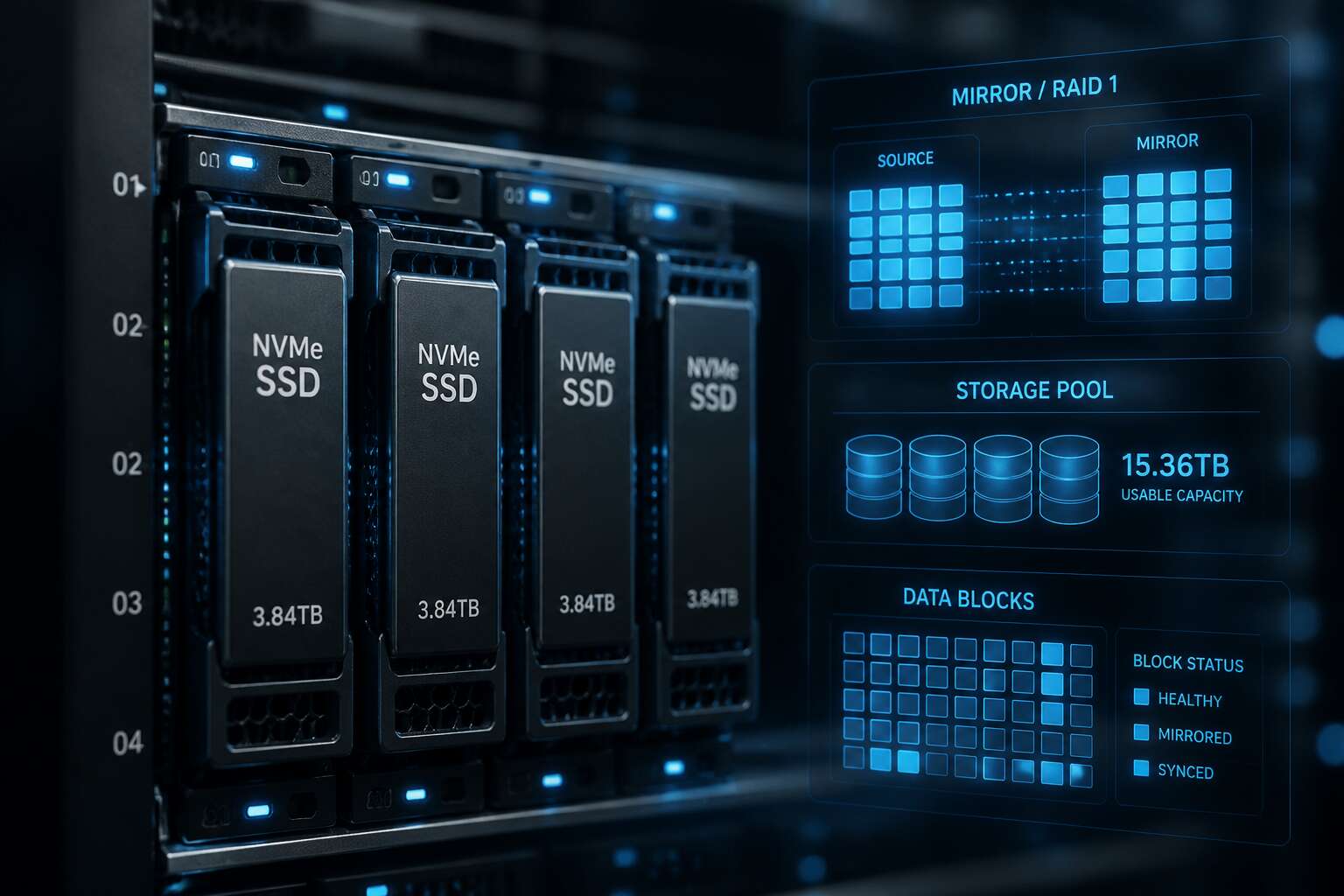
Flash storage has become the standard foundation for modern infrastructure, but its true value emerges only with intelligent data management. As a storage engineer, I have seen workloads transformed by the synergy of an nvme zfs mirror. The latency drops are not incremental, they are startling!
This configuration forces the controller to think differently, prioritizing data integrity over raw speed. High performance systems no longer tolerate the mechanical delays of spinning disks. They demand immediate access to cached data, and flash delivers that through parallel channels. The real challenge lies in managing the endurance and parity overhead. A mirror duplicates writes across two devices, which reduces risk while maintaining throughput.
Core Principles of Copy-on-Write Filesystems
Copy-on-write filesystems change the order of operations. New data lands in unused blocks first, then metadata pointers update atomically. A power loss during that window leaves the old state fully intact, never a half-written file. This transactional behaviour is why the nvme zfs mirror can keep both sides identical without replaying a journal.
When I evaluate modern storage foundations, these core principles stand out:
- Immutable data blocks make checksum verification straightforward.
- Atomic metadata updates remove the need for filesystem repair after crashes.
- Snapshots exist as pointer sets, not duplicated data.
These properties give the nvme zfs mirror a decisive advantage. The system knows exactly which block version is authoritative. That clarity shortens recovery windows and preserves data integrity.
Why Data Redundancy Matters for Enterprise Workloads
Enterprise workloads carry a permanent bet against failure. Every transaction committed to storage represents operational continuity or revenue, and a single silent data corruption event can unravel both. In environments where downtime costs exceed R100,000 per hour, redundancy is not a luxury. It is the architecture itself.
A nvme zfs mirror addresses this by maintaining two independent copies of every block across separate physical drives. If one disk degrades, the system immediately serves data from the surviving member without interruption. This matters for transactional databases and virtualised infrastructures where split-second consistency dictates performance. The mirror ensures that both devices hold identical bit states, verified continuously through checksums rather than assumed trust.
South African enterprises face unique pressures. Grid instability and ambient heat stress storage hardware relentlessly. A nvme zfs mirror reduces the window of exposure when components fail under these conditions. Rebuild times remain short because the copy process is streamed rather than reconstructed, limiting the duration of vulnerability. The result is a storage foundation that treats redundancy as a continuous property, not a reactive measure.
Planning a Resilient Storage Architecture
Assessing Workload Requirements and I/O Patterns
A storage architecture that survives real-world pressure rarely emerges from guesswork. When planning a resilient storage layer, I always start by interrogating the actual I/O patterns rather than the glossy specification sheet. Workloads in financial services or logistics often display erratic bursts, especially during month end processing. An nvme zfs mirror can absorb those shocks, but only if you measure the read to write ratio and queue depth across every tier.
Consider these dimensions before committing to hardware:
- the ratio of random to sequential access at peak hours
- the number of synchronous requests that cannot tolerate latency
- the block size distribution from your database engine
Each variable reshapes how mirror pairs respond. I have watched teams assume uniform traffic, then watch their nvme zfs mirror stumble under unexpected metadata churn. Assess with real telemetry, and your architecture becomes a dependable foundation, not a hopeful gamble.
Selecting Compatible Hardware Components
A storage array is only as resilient as its weakest PCB trace. Selecting compatible hardware for an nvme zfs mirror demands attention to signal integrity, not just capacity figures. The components must speak the same electrical language, especially when operating in harsh South African conditions where heat and dust are constant adversaries.
The baseline requirements for a solid setup are surprisingly specific:
– Controller cards with native PCIe 4.0 support and a proven Linux driver stack
– Enterprise grade NAND with power loss protection capacitors on every module
– Firmware that allows stable trim pass-through and predictable error reporting
My experience shows that mixing consumer drives with server controllers creates silent corruption issues. The nvme zfs mirror pair should ideally come from the same production batch. This ensures identical performance characteristics across the fault boundary. Mismatched storage class memory or inconsistent queue depths will undermine the parity calculations that ZFS manages so well.
Each component choice influences scrub performance and recovery time. The data tree depends on exact I/O completion ordering. When the hardware respects command ordering properly, the nvme zfs mirror behaves with elegant precision. It becomes a dependable partner for the long haul, whether your data lives in Johannesburg or Cape Town.
Comparing Mirroring with Alternative Parity Configurations
A single failed NVMe drive exposes the real cost of your redundancy choice. When planning a resilient storage architecture, the decision between mirroring and parity configurations determines how fast you recover. An nvme zfs mirror writes each block to two drives. Parity layouts like RAIDZ spread redundancy across the whole array, which seems efficient until a rebuild begins.
The rebuild math tells the real story. A mirror rebuild copies from one healthy disk to a replacement. A RAIDZ rebuild reads every remaining drive, recomputes parity, and then writes. On fast NVMe hardware, the difference is measured in minutes, not hours.
- Mirror: two drives, one failure tolerated, immediate rebuild
- RAIDZ: more usable capacity, heavier CPU load, longer recovery windows
Most South African enterprises I advise start with parity for capacity reasons. They switch to an nvme zfs mirror after the first failed rebuild. The simpler fault domain and predictable latency under load matter more than raw capacity. Every read can come from either disk. That consistency matters for databases and virtual machines running in Johannesburg or Cape Town.
Capacity Planning and Flash Endurance Considerations
Planning a resilient storage architecture demands a clear-eyed view of capacity and endurance. Most enterprises overspend on raw capacity by 40% while underspending on endurance. This mismatch becomes obvious with NVMe, where the media outlives the server chassis. An nvme zfs mirror changes the failure calculus because it distributes writes across two drives. Wear leveling improves, and the combined write endurance doubles for read-heavy workloads.
The capacity question is a strategic one. ZFS snapshots and clones consume space in ways that traditional filesystems do not. For databases and virtual machines, the write amplification from parity checks can shorten drive life. A mirror avoids this entirely. The result is a storage layer that behaves predictably under sustained load, even when drives operate near their thermal limits in a Johannesburg colocation rack.
– Workloads with high random write rates, such as OLTP databases, benefit from mirrored write paths
– Virtual machine clusters with mixed read and write patterns gain from parallel reads across both mirrors
– Backup targets with sequential write patterns can use lower endurance NVMe drives without risk
Endurance planning should start with the working set. Small, hot datasets that fit in ARC (Adaptive Replacement Cache) reduce drive writes considerably. With an nvme zfs mirror, every read can come from either disk. Cache hits become more likely because the pool maintains two copies of metadata. Over a five year lifecycle, the endurance savings from a mirror often exceed the cost of the extra drive.
Configuring the Storage Pool
Preparing Storage Devices for Initialization
The moment you issue the zpool create command, every previous filesystem decision becomes tangible. For an nvme zfs mirror, device preparation determines whether that moment yields silence or a cascade of errors. In South African data centers, where ambient heat and grid instability already test hardware, you cannot afford sloppy initialization.
Begin by confirming both drives are visible and report identical capacities. Then wipe any leftover partition tables or RAID metadata from earlier experiments. Use wipefs -a on each device, followed by a verification read.
- Check alignment with nvme id-ns to confirm the logical block size matches your ashift value.
- Reset the drive’s firmware state using nvme format, ensuring a clean namespace.
- Write a random pattern across the full device to expose latent bad blocks before the mirror engages.
Only after this preparation should you consider creating a single partition per disk with sgdisk. The goal is a predictable starting state. When ZFS later probes the devices, it sees identical, sanitized hardware ready for the two-way mirror.
Creating the Redundant Pool Structure
Command syntax defines the moment your prepared NVMe drives become a single resilient entity. The zpool create command with the mirror keyword tells ZFS to write identical data to both devices simultaneously. For a two-device nvme zfs mirror, the structure holds one vdev with two leaf disks. This layout tolerates a single device failure without interrupting service. South African operators often rely on this exact structure when grid instability threatens uptime.
A few parameters deserve attention:
- The ashift value must match what you confirmed during device preparation.
- The autoexpand property accommodates future device replacement.
- The primarycache setting controls how aggressively the pool uses NVMe flash for read caching.
Each flag either protects the nvme zfs mirror or optimises its behaviour. Once you issue the command, ZFS begins building the redundancy layer, copying metadata and allocating space across both leaves. The pool is now ready for datasets, snapshots, and the workloads you defined earlier.
Enabling Compression and Deduplication Features
Once the nvme zfs mirror is live, the pool’s default properties are conservative. Enabling compression is a low risk adjustment. The LZ4 algorithm compresses data on write without creating a bottleneck. For SSD and NVMe storage, this reduces the volume of data written to flash, extending endurance.
Deduplication is a different matter. It consumes memory proportionally to the dataset’s unique blocks. Most South African workloads do not produce enough duplicate data to justify the cost. I recommend leaving dedup off and revisiting the decision if storage growth becomes extreme.
A small set of properties makes sense for most deployments:
- compression=lz4
- atime=off
- xattr=sa
- dedup=off
These settings keep the nvme zfs mirror responsive and durable without sacrificing redundancy.
Establishing Datasets and Logical Volumes
With the pool finally live, the real work begins. Datasets divide available space into distinct filesystems, each carrying its own compression, quotas, and snapshot schedule. Zvols, the logical volumes of the ZFS ecosystem, provide raw block devices for virtual machines or database engines that prefer direct access.
A sensible layout prevents administrative contortions later. Separate user homes from application directories and backup repositories. Quotas on one dataset do not throttle another, and snapshot policies can differ per workload:
- tank/homes for user profiles
- tank/apps for production application data
- tank/backups for retention and replication
The nvme zfs mirror remains the underlying storage layer. Dataset structure shapes daily operations, and a thoughtful one means fewer migrations when storage demands shift.
Tuning Recordsize and Block Allocation
Default recordsize settings feel comfortable, but they are a starting point, not a final answer. A 128 KiB default can create needless read-modify-write cycles on a random access workload. Your nvme zfs mirror can outperform that with deliberate tuning.
Block allocation interacts with write patterns. Small database transactions demand a smaller recordsize, often 16 KiB or even 8 KiB. Larger sequential files, like video or backup blobs, justify 1 MiB records. The mirror structure remains the same, but the data layout adapts to its purpose.
Sync writes deserve specific attention. `sync=always` on a cached dataset affects performance more than any other setting. NVMe latency hides some of that cost, but your mirror still benefits from `logbias=latency` for synchronous workloads.
When defining properties, consider three parameters:
1. `recordsize` aligned to average transaction size
2. `ashift=12` or `ashift=13` for modern 4K and 8K drives
3. `sync` set per dataset, not per pool
The nvme zfs mirror thrives on this level of granularity. A meticulously tuned recordsize means the copy-on-write engine produces fewer partial blocks. The result is predictable latency that survives contention across multiple datasets.
Optimizing for Speed and Durability
Aligning Sector Sizes for Flash Media
Alignment between the operating system, the ZFS pool, and the physical flash media determines the true velocity of an nvme zfs mirror. When a controller writes a 4K block to a drive that expects 8K chunks, the firmware performs a read-modify-write operation. That silent penalty accumulates across thousands of IOPS, turning theoretical peak speeds into a sluggish compromise. The `ashift` value, set at pool creation, must match the device’s native physical sector size. Choosing a setting that is too low introduces write amplification, directly reducing the endurance of the NAND cells.
Modern NVMe drives often report a logical sector size of 512 bytes, but their physical sector size is frequently 4K or larger. Setting `ashift=12` (for 4K sectors) is a safe baseline, yet some enterprise SSDs use 8K internally. Forcing a higher alignment value rarely hurts performance, but a lower one always costs durability.
– Low alignment causes extra write cycles on every update.
– High alignment wastes a small amount of capacity on very small records.
– Proper alignment ensures each write maps cleanly to a physical page.
The result is a steady state for the nvme zfs mirror where the array delivers predictable latency. Flash cells thrive under consistent, aligned writes, and ZFS’s checksumming validates each read without needing rewrite cycles. This precision becomes the bedrock for a storage system that maintains both speed and longevity under sustained pressure, a critical balance for production environments.
Managing Write Cache and Separate Log Devices
Storage vendors love quoting sequential read speeds because those numbers make buyers swoon. But for a database running on an nvme zfs mirror, the real question is how fast a single synchronous write can be acknowledged. Your NVMe drive’s volatile write cache answers quickly, until a power failure erases the answer.
Separating the ZIL onto its own log device moves those transactions off the data vdevs. A few realities keep this arrangement honest:
- Log drive endurance must match the write load, otherwise annual replacement becomes a hobby.
- Log devices stay away from the data vdevs, so one failure does not claim both.
- Mirrored log devices serve setups where losing acknowledged writes is not an acceptable outcome.
The ZIL does not accelerate reads or inflate your benchmark numbers. It exists so a crash does not contradict your storage’s promises. For an nvme zfs mirror, that distinction turns speed into durability.
Monitoring Latency and Sustained Throughput
Peak performance numbers are theatre. The nvme zfs mirror shows its true nature under sustained pressure, when latency drifts and throughput settles into a steady rhythm. Monitoring latency across each vdev gives early warning before users feel the change.
I have watched mirrored pools produce impressive burst results, only to slow when the queue deepens. Read paths and write paths degrade differently, so tracking them separately matters. Sustained throughput reveals what the hardware can maintain over hours, not what it can spike toward for seconds.
- Latency percentiles expose outliers that averages hide.
- Throughput consistency matters more than peak bandwidth.
- Firmware changes how drives respond to pressure.
The difference between a healthy pool and a struggling one is visible in the latency chart long before anyone complains!
Adjusting Transaction Groups and Sync Write Behavior
One stringent fact governs every enterprise array: a storage stack that never syncs will lose data. The nvme zfs mirror, when tuned correctly, avoids that compromise. I adjust transaction groups to align with the workload’s natural cadence, lengthening the window for writes during bursts. Sync write behavior dictates when the pool acknowledges completion. For NVMe devices, the penalty for immediate commits shrinks, yet durability demands careful control.
The critical levers:
- The length of the transaction group window.
- The behavior of the synchronous write queue.
- The separation between sync and async paths.
Each decision changes how the mirror performs under sustained pressure. Speed remains, but durability never yields!
Leveraging Adaptive Replacement Cache Strategies
A single NVMe drive can deliver hundreds of thousands of random read operations per second, yet a cache strategy that ignores the mirror’s redundancy mechanics will stall at a fraction of that potential. The Adaptive Replacement Cache (ARC) is the silent arbiter between flash speed and data safety. For an nvme zfs mirror, the ARC must prioritize the right data types during bursts, not just raw volume.
When the pool services a heavy read workload, the cache tracks both recency and frequency. It holds metadata for the mirror’s rebuilding blocks, while pushing user data to the front when the workload demands it. The balance depends on these factors:
– Hit ratio targets for sequential scans versus random reads.
– The ghost list pressure that preempts cache thrashing from one-off data streams.
– The split between resident and non-resident entries in the ARC’s internal hash table.
Every tweak to these elements shifts how the mirror absorbs latency spikes. I watch the cache’s behavior under a sustained database query pattern, where the pool serves repetitive index reads. The ARC promotes those entries into the frequently used segment, allowing the nvme zfs mirror to operate with a steady response curve. Durability holds because the cache never bypasses the underlying copy-on-write transactions. It only makes the reads smarter.
Maintaining and Monitoring System Health
Implementing Regular Scrubbing and Resilvering Schedules
Scrubbing is the only defense against silent corruption. My nvme zfs mirror gets a scrub every Sunday at 02h00. That is when the array is idle. It reads every block and compares checksums. Errors are caught before they propagate.
Resilvering is more urgent. When a drive fails, the mirror rebuilds. But with NVMe, the rebuild is fast. Too fast. It can saturate the PCIe lanes and slow production. So I throttle the resilver speed. I set it to 50% during business hours.
- Scrubs run monthly or weekly, depending on workload
- zpool status reveals checksum errors
- Resilver delay is adjustable via zfs_vdev_resilver_delay
That mirror has survived three drive replacements without a hiccup. The secret is sticking to the schedule.
Setting Up Alerts for Drive and Pool Metrics
Silence is not a health check, though a quiet NVMe ZFS mirror often feels reassuring. Persistent monitoring requires asking the storage system pointed questions about its own state. The `zpool events` command offers a live feed of every anomaly before it shadows your workload. Pair that with ZED, the ZFS Event Daemon, to send notifications the moment a drive reports a checksum deviation or a slow I/O stall.
Your tolerance for intervention determines your alert threshold. I prefer immediate notification for any fault indicator on my nvme zfs mirror, but a delay for telemetry probes. Configure metrics to parse indicators such as:
– Pool scan progress and errors in `zpool status`
– Drive temperature and reallocated sector counts
– Latency percentiles for read and write operations
– Device removal or insertion detection
South African infrastructure demands proactive awareness. Load-shedding creates voltage instability that harms NVMe controllers. A sudden power dip that forces a system reset might leave a healthy mirror degraded. Without timed alerts, you discover the failure after the next business day’s full I/O load. Monitoring gives you the insight to react in minutes, not after hours of degraded production. The metric that matters is the trend, not the number itself.
Managing Firmware and Driver Updates Safely
Firmware updates are the quiet killers of healthy arrays. I have seen a flawless nvme zfs mirror lose both disks after a botched vendor flash. The fix is discipline. Before any update, snapshot your ZFS configuration and confirm the exact current firmware version. Never trust the vendor’s “latest” without reading the release notes!
- Stage the update on a non-critical volume.
- Verify checksums of the firmware file.
- Update one drive at a time, not both.
Then watch the pool for at least one full scrub cycle. In South Africa, unstable grid conditions amplify the risk. A driver patch intended to improve power handling can expose latent controller bugs. Keep a rollback plan and a testable boot environment. That is the safer path for your nvme zfs mirror.
Establishing Backup and Remote Replication Workflows
A mirror is not a backup. That truth should guide every maintenance routine. Monitoring health means watching more than the dashboard. Check SMART thresholds, reallocated sectors, and temperature trends. These metrics tell you when a drive is fading before the kernel does.
Backup and remote replication workflows demand the same discipline, and I have learned this the hard way. An nvme zfs mirror protects against drive failure, not against ransomware or a stolen server. Use zfs send and receive to push snapshots to a remote host. Keep the backup independent of the primary pool.
For the replication chain, consider this order:
- Take a snapshot with zfs snapshot.
- Send it incrementally to the remote target.
- Retain only the last few snapshots locally.
In South Africa, where bandwidth can be expensive, throttle replication to off-peak hours. A healthy nvme zfs mirror is worthless if your backup workflow is an afterthought.
Troubleshooting Common Performance and Reliability Issues
Diagnosing Unexpected Bottlenecks in Storage Paths
Bottlenecks in an nvme zfs mirror rarely announce themselves cleanly. A missized queue or a noisy PCIe lane can stall writes while reads stay fast. I recall a production build where one mirrored member delivered half its expected throughput for weeks before anyone noticed.
Start with per-device stats rather than pool averages. An nvme zfs mirror gives you a clean comparison point; check the two vdev members against each other. When one drive sits near full utilization and the other idles, the problem is physical, not logical. Check the slot, cable, and thermal profile before touching ZFS tunables.
Common failure signatures include:
- Persistent read latency gaps between the two devices
- Scrub throughput that drops sharply after a firmware event
- Unexpected queue depth from a single application thread
Handling Device Failures and Replacement Procedures
When a member of an nvme zfs mirror fails, the pool keeps serving data, but the protection is gone. I have watched teams assume the mirror will heal itself. It will not. The failed drive must be identified, detached, and replaced before the next failure occurs.
The replacement starts by confirming the physical slot using the drive serial number. Do not trust the Linux device name alone, since it can shift after a reboot. Once the right drive is in place, run a secure erase to clear lingering namespace metadata. Then issue a replace command rather than adding a new vdev. This keeps the original geometry intact and preserves the nvme zfs mirror layout.
The healthy member carries the full read workload during a swap, so monitor latency while the new drive spins up.
Follow these steps for a clean swap:
- Check the pool status to confirm which member failed.
- Physically swap the drive and confirm the new serial in the slot.
- Run zpool replace with the old and new device IDs.
- Monitor resilvering progress and watch for read errors.
Recovering from Pool Errors and Corrupted Data
When ZFS starts muttering checksum errors, I start paying attention. Corruption happens. Your nvme zfs mirror either absorbs it or exposes it, depending on how carefully you read the scrub reports.
Persistent errors in the scrub output mean one member has diverged from its twin. The healthy side gets promoted. ZFS rewrites the damaged blocks, but that assumes you verified the correct side first. I have seen administrators assume the wrong member was at fault, which turns a simple repair into a full restore.
If both members disagree? That is a philosophical dilemma best resolved by your off-site backup.
Avoiding Common Pitfalls in Flash-Based Redundant Pools
An nvme zfs mirror is not a guarantee against subtle misconfiguration. Flash media exposes weaknesses that spinning disks often mask. One critical pitfall involves the ZIL (ZFS Intent Log). If you assign a separate log device, ensure it matches the endurance class of your mirrors. A low-end consumer NVMe drive used as a SLOG will fail quickly under synchronous workload pressure. When it does, the entire pool experiences a massive performance regression.
Another frequent issue involves firmware quirks in power-loss protection. I have seen drives that report data as flushed when they have not fully committed it to stable storage. The nvme zfs mirror structure may still proceed, but you risk corruption on a sudden power failure. South Africa’s grid instability makes this a tangible concern, not a theoretical one. Verify that your drives support proper power fail semantics and do not disable their internal capacitors.
– Review the pool’s ashift value after creation. A mismatch means severe write amplification.
– Confirm that both mirrors use identical drive models and firmware revisions.
– Monitor the drive’s SMART attributes for reallocated sectors or uncorrectable errors. Replace a drive at the first sign of trouble, not after a scrub reveals it.
– Check the system logs after a crash to see if the HBA or NVMe controller reset during the event.
These checks seem simple, yet many administrators skip them. A balanced mirror can still suffer from metadata corruption if the underlying hardware lies about its write paths. Also, pay attention to queue depths. A single NVMe drive with a saturated queue can bottleneck an entire pair. You might see latency spikes on a healthy member simply because the controller has too many pending commands. Tuning the vdev queue limits can prevent this.
The result is a common phenomenon in the field: one drive reports a higher error count and gets blamed for the issue, while the real culprit is a misaligned recordsize or a failing cable. The scrub output works as evidence, not as a verdict. That discipline will preserve both your data and your sanity.
Best Practices for Long-Term System Stability
There is a particular silence in the server room when an nvme zfs mirror runs without complaint. That silence deceives. The real work begins after setup, in the quiet rituals of observation and response.
When troubleshooting, resist the urge to replace a drive based on one error count. Compare behaviour across both members. A sudden latency spike on a single side often points to thermal throttling or a degraded link.
- Verify the pool’s health before touching hardware
- Document baseline performance metrics
- Test the replacement drive in isolation
For long-term stability, establish a rhythm around scrubs. South Africa’s grid forces unexpected power events. The pool survives those moments only when you review what happened after them.

0 Comments