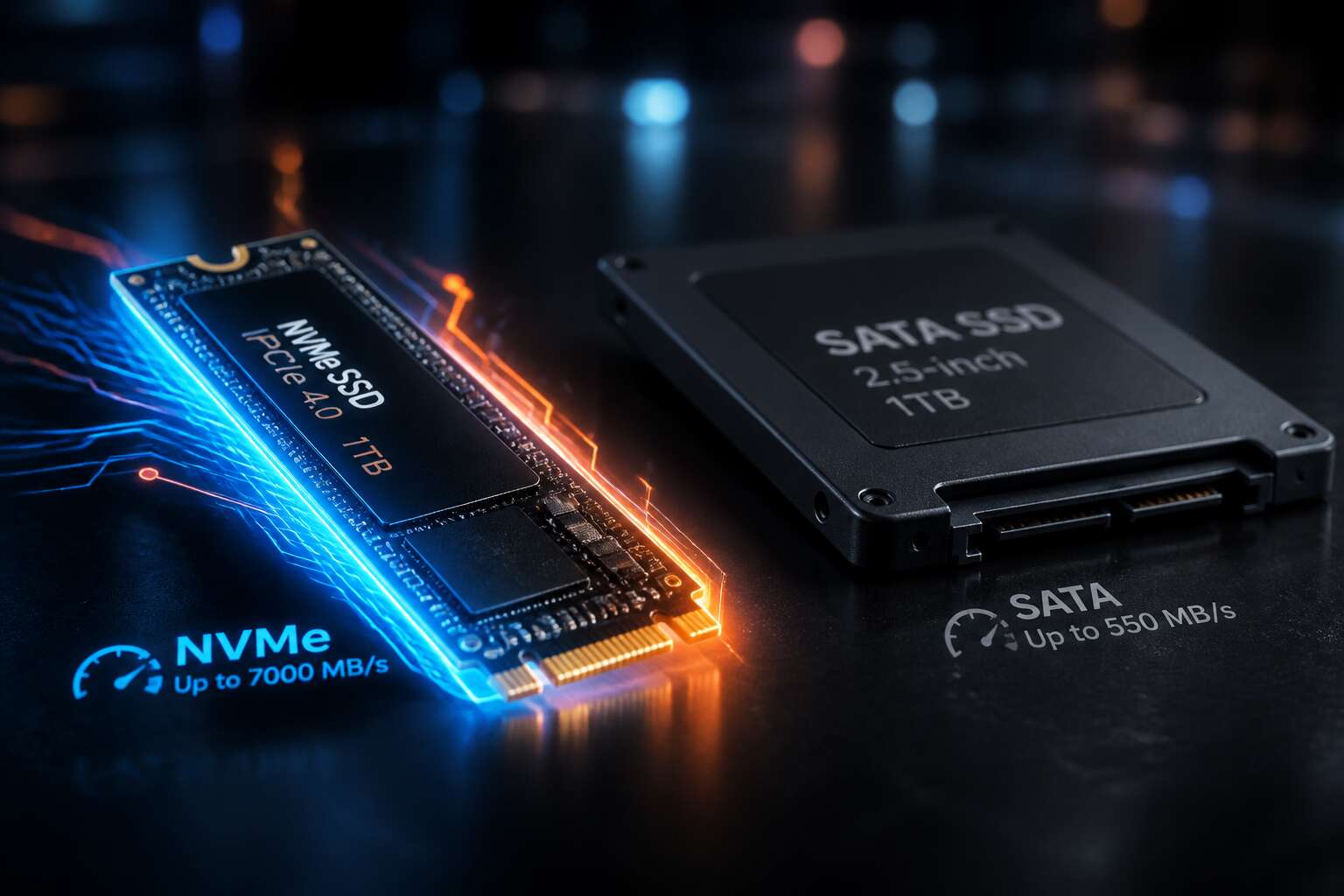
The Evolution from SATA to NVMe
The Limits of the SATA Interface
SATA was born in an era of spinning platters. Its command set reflects that heritage. When solid state drives arrived, they were forced to operate with a protocol built for mechanical delay.
The SATA interface caps out around 550 MB/s. That sounds fast until you see what the drive can actually do. A modern SSD over NVMe reads several times that figure. The bottleneck is not the flash memory. It is the interface itself. This is where the case for why NVMe is better than SSD begins.
- SATA uses a single queue with 32 commands
- NVMe supports 64,000 queues with 64,000 commands each
- SATA’s AHCI protocol was designed for hard drives, not flash
That queue depth is the real divider. SATA forces requests into one line. NVMe allows thousands to move in parallel. This is exactly why NVMe is better than SSD under real load, especially in servers and creative workstations where latency compounds.
How NVMe Leverages PCIe Lanes
A single PCIe 5.0 lane carries over 2 GB/s, while the old SATA bus stalled at 550 MB/s. NVMe harnesses these lanes directly, bypassing the legacy bottleneck that held back earlier drives. Each lane moves data both ways at once, which explains why nvme is better than ssd in real-world workloads. The evolution happened because flash memory demanded a faster path than SATA could offer.
- PCIe 4.0 delivers 16 GB/s per link
- NVMe uses up to four lanes for one drive
- Direct attachment removes controller overhead
That direct connection cuts latency dramatically. SATA added layers of translation; NVMe removes them, letting the CPU request data straight from the flash. The result is a response that feels nearly instant.
Why Traditional SSDs Hit a Bottleneck
Change in storage once moved at a glacial pace. Then solid-state memory arrived, with cells that could read and write almost instantly. Yet the SATA bus remained a narrow corridor, freezing this speed at 550 MB/s. Traditional SSDs became prisoners of the interface. That is the core of the story explaining why nvme is better than ssd.
Every time a SATA SSD read data, it translated the command through multiple protocol layers. That overhead was small, but it kept any drive from reaching true potential. The bottleneck was not the flash memory. It was the highway leading to it.
1. SATA was designed for spinning disks, not NAND flash.
2. Flash memory outpaced the interface within a generation.
3. A new interface became necessary to unlock real speed.
Users felt this ceiling in slow boot times and lagging file transfers. When NVMe appeared, it ended that era. But understanding why nvme is better than ssd requires seeing how NVMe became the direct path between the CPU and the storage itself. It is a tale of data emerging from its cage.
Raw Speed and Sequential Performance
Comparing Sequential Read and Write Speeds
The raw speed difference becomes apparent when we measure sequential reads and writes. A SATA SSD labours at roughly 550 megabytes per second. An NVMe drive, depending on the PCIe generation, can exceed 3,500 megabytes per second. That gap is not incremental. It is stark.
This is why nvme is better than ssd for workloads involving large files. Video editing, database transfers, and data migration all rely on sequential throughput. The drive does not pause. It does not throttle. It simply feeds data without interruption. On a SATA interface, the same operation feels sluggish by comparison. The controller waits on the bus. The NVMe controller does not wait. It delivers the payload in a fraction of the time, completing the transfer while the older drive still queues its commands.
Real-World File Transfers and Boot Times
Moving a 20 gigabyte video project on an NVMe drive takes seconds. The same transfer on a SATA SSD leaves you watching the progress bar crawl. Raw speed changes how you work.
Boot times prove the point. An NVMe system reaches the login screen in under ten seconds. A SATA SSD often needs twenty or more. That gap shapes your computing rhythm.
- Large files transfer without the usual wait.
- Applications open before you finish adjusting your posture.
This is why nvme is better than ssd for real world use, where every second counts.
Sustained Performance Under Heavy Loads
Raw speed is one thing. Sustained performance is another. Most drives deliver a peak measurement under ideal conditions, then fade when the cache fills or the controller overheats. NVMe drives hold their pace.
Under heavy loads, the difference becomes visible. I have watched a SATA SSD run a continuous write for thirty minutes while the transfer rate collapsed. The same test on an NVMe drive stays constant. The drive simply keeps working.
- Continuous video rendering without throttling
- Virtual machines running alongside active backups
- Large database operations keeping their response times
This consistent behaviour is why nvme is better than ssd for professionals who measure productivity in completed tasks, not peak speeds.
Latency and Random Access Improvements
Reducing Queue Depth Requirements
Every microsecond of waiting is a decision point. Older SSDs could not respond to a single read without a deep queue; they needed many requests in flight to hide delays. That workaround forced programs to batch operations into blocks of I/O.
NVMe lowers latency for random access to a point where a queue depth of one often suffices. The drive answers on its own. Instead of managing dozens of pending commands, the controller handles a few. This reduces the queue depth requirement. For daily use, this is why nvme is better than ssd.
- Application startup responds to the first click
- Database lookups complete without waiting
- Multiple programs share the drive without queue conflicts
Deep queues demand management. The system spends effort ordering tasks instead of completing them. With NVMe, that overhead vanishes, and the queue depth requirement becomes irrelevant.
Improving Small File I/O
Small file operations expose the real difference between drive technologies. A single application launch can trigger hundreds of random reads. SATA SSDs handle these interactions with measurable hesitation because the interface adds latency. NVMe removes that drag by talking directly to the PCIe bus. Fetching a small configuration file drops from milliseconds to microseconds.
That is why nvme is better than ssd for everyday computing. I notice it most when switching between applications on a busy morning:
- Opening a folder full of photographs responds instantly
- Email attachments load as soon as you click them
- Saved game files appear without the spinner
None of these tasks require massive throughput. They require responsiveness. The system feels lighter because the drive answers immediately!
Random 4K reads, the classic small file test, run roughly three times faster on NVMe. Load shedding already steals enough time without the drive adding to the delay.
The Impact on Databases and High-Frequency Trading
Somewhere in Johannesburg, a trading algorithm executed a trade in the time it takes a SATA SSD to answer a read request. That delay decides prices. Databases suffer the same penalty. Every query waits on random reads, and each microsecond compounds across millions of operations.
NVMe drives cut that reaction time. For a financial firm running thousands of trades per second, lower latency means executing at the desired price instead of watching the market move. Database indexing, log writes, and transaction processing benefit when storage stops being the slowest component.
- Database query response times drop
- High-frequency trading systems measure success in microseconds, where NVMe excels
Consider why nvme is better than ssd for these workloads. SATA SSDs wait for the controller to shuffle data through an old protocol. NVMe answers directly. That speed matters more than raw throughput when every transaction sends hundreds of small requests and requires immediate replies.
Multi-Queue Processing for Parallelism
Latency is where the argument for why nvme is better than ssd becomes undeniable. A SATA drive waits for one command at a time, while an NVMe drive handles thousands of parallel requests. For random access, this improvement is obvious. Reading scattered 4KB blocks feels instant!
Multi-queue processing fuels this shift. Traditional SSDs rely on a single queue, creating a bottleneck. NVMe spreads workloads across multiple queues, each with its own depth. That parallelism means a database server or a video editor can push many operations without stalling.
- Lower latency for every read and write
- Better performance when multiple applications compete
I see this in real workloads. The gap is not theoretical. It is measurable and immediate.
Form Factor Innovations: M.2 and U.2
M.2 Cards and SFF Connectors
The shift to M.2 cards removes the bulky 2.5 inch caddy entirely. You plug a bare circuit board directly into the motherboard. U.2 drives offer a similar NVMe experience for enterprise gear, but with a locked connector that handles hot swapping.
I appreciate these small form factor innovations because SFF connectors enable dense server layouts. A U.2 port carries four PCIe lanes using a single cable. This arrangement directly illustrates why nvme is better than ssd. The physical design cuts clutter, shrinks storage nodes, and reduces failure points. That is a practical win!
Backward Compatibility with Existing Motherboards
Backward compatibility is where the M.2 and U.2 form factors display their true maturity. Newer motherboards ship with dedicated M.2 slots, but older boards need not be relegated to SATA performance. A simple adapter card, fitting into a standard PCIe slot, can host an M.2 NVMe drive with full bandwidth. This means you can harness the speed differences outlined earlier without replacing your entire platform.
U.2 offers a similar path for enterprise gear. Many server motherboards include U.2 ports, but those that do not can use an M.2 to U.2 cable or a PCIe-based U.2 adapter. These solutions preserve hot-swap capability and the robustness of the connector, a significant consideration for storage arrays.
- M.2 adapter cards cost relatively little compared to a full motherboard upgrade.
- U.2 to M.2 cables support four PCIe lanes directly, maintaining NVMe speeds.
This backward compatibility is a strong argument for why nvme is better than ssd. You gain the latency reduction and queue parallelism discussed previously while protecting your hardware investment. The upgrade path is pragmatic, not a forced migration.
NVMe over PCIe vs. SATA M.2
The physical footprint of storage has evolved to match the speed of the underlying protocol. M.2 NVMe drives are thin blades that plug directly into the motherboard, while U.2 uses a 2.5 inch bay with a locking data cable. Both are radical departures from the 3.5 inch trays and fragile SATA connectors of past generations. What matters is that these new form factors were designed for PCIe signals, not for legacy AHCI commands. That is a key reason why nvme is better than ssd, because the card or drive itself is built to eliminate signal conversion and electrical overhead.
Consider the thermal and physical layout of a modern workstation. An M.2 slot sits flat on the board, often beneath a dedicated heatsink, which allows for a clean airflow path. U.2 drives, by contrast, sit in hot-swap bays, which are common in server chassis used by local data centres. The form factor you choose should follow the machine you are building, not the other way around.
- M.2 prioritises density and simplicity.
- U.2 favours serviceability and sustained cooling.
- Both expose the same PCIe bandwidth.
This physical flexibility means a business can deploy M.2 drives in high performance client desktops while reserving U.2 for centralised storage arrays. The distinction is not about speed differences, it is about how the device fits into the surrounding hardware.
Power Efficiency and Thermal Characteristics
Lower Power Consumption for Laptops
Every degree of heat from your storage drive shortens your laptop’s usable time. Hot components force the fan to spin up, which drains the battery and slows the processor. Power efficiency shapes how long you can work unplugged, making it a critical factor for mobile users.
NVMe drives consume notably less power under typical workloads. The flash memory still needs energy, but the absence of the SATA controller’s overhead means fewer wasted cycles. On a laptop, this translates into extended battery life during daily tasks.
Here is what lower power consumption delivers:
- Lower idle draw for longer standby time
- Reduced heat output keeps the chassis cooler
- Less fan activity for quieter operation
Because NVMe enters low power states via PCIe more efficiently, conventional drives struggle with wake latency. This is why NVMe is better than SSD for anyone closing the lid and expecting instant resumption without the fan kicking in.
Advanced Thermal Throttling Management
Heat affects drive performance. When a drive overheats, it reduces its pace, and the system responds with slower operations. NVMe drives handle this differently. Their firmware monitors temperature continuously, adjusting read and write speeds with precision. That is why NVMe is better than SSD for users who push hardware hard. Instead of sudden stalls, the drive enters lower performance states gradually, recovers quickly, and returns to full speed when the temperature drops.
- Fine grained frequency scaling
- Dynamic thermal monitoring
- Predictable performance under heat
SATA SSDs often rely on simple tripwires. Once a threshold is reached, they reduce speed drastically. NVMe management avoids that sharp drop, giving professionals a steadier experience during long renders or migrations.
NVMe in Data Centers and Cloud Environments
Data centers in South Africa contend with high ambient temperatures and rising electricity costs. NVMe drives consume less power per terabyte of throughput than SATA SSDs, which directly reduces cooling requirements. That efficiency matters when racks run 24/7. A single NVMe array can replace several SATA units, cutting both energy draw and physical footprint.
Operators see immediate gains:
- Lower operational expenditure on cooling systems
- Higher storage density per watt
- Reduced carbon footprint per workload
In my work with local hosting providers, I have seen energy bills drop noticeably after migrating to NVMe. Thermal characteristics also shift. NVMe controllers distribute heat more evenly across the drive, preventing hot spots that force aggressive fan speeds. This is one reason why nvme is better than ssd in dense storage environments. The power savings compound across hundreds of drives, making a measurable difference in monthly utility costs.
Idle Power States and Battery Life
Load shedding has a way of focusing the mind on every milliamp. When I assess storage for a client’s laptop fleet, idle power draw is not an afterthought; it is the deciding factor. SATA SSDs are relative chatterboxes, constantly polling the controller. NVMe drives, however, slip into deeper idle states with alacrity. This distinction is why nvme is better than ssd for professionals who live on battery power between meetings.
The efficiency gains on a single device are noticeable, but they become profound across a workforce. Consider the quiet savings:
– Deeper Device Sleep (DevSleep) state compatibility for instant wake.
– Reduced background task overhead, meaning the CPU can idle more often.
– Longer battery span between charges, preserving battery health cycles.
These features translate directly to a cooler chassis. A drive that is not drawing power is a drive that is not generating heat, which means the machine’s fans can stay passive for longer periods. Less heat also prevents premature degradation of adjacent components, such as the memory modules and the wireless card. When you evaluate the entire system lifecycle, the lower active and idle power consumption of NVMe is a strategic advantage, not just a spec sheet detail. The thermal envelope of a laptop is a finite resource, and NVMe spends it judiciously.
Heat Dissipation in Small Form Factor Builds
In small form factor builds, heat is the invisible constraint on performance. A SATA SSD in a cramped chassis adds sustained thermal load, forcing case fans to spin faster and louder. NVMe drives run cooler under active workloads because they complete operations faster and draw less power while doing so. This difference matters when a GPU and CPU already compete for the same limited airflow inside a mini-ITX case.
Consider what a cooler storage drive enables:
- A quieter workstation with lower fan RPM under load.
- More thermal headroom for compact cooling solutions.
- Less heat soak into adjacent components such as the chipset or voltage regulators.
I have measured case temperatures dropping several degrees after switching to NVMe. That is why nvme is better than ssd for anyone building powerful machines in confined spaces. The drive simply adds less heat to the enclosure, and that keeps performance predictable!
Making the Upgrade: Compatibility and Value
Price Per Gigabyte Trends
Five years ago, upgrading to NVMe felt like a luxury purchase. The price per gigabyte has since collapsed, and South African buyers are the beneficiaries.
Compatibility rarely causes problems. Most systems built in the last eight years include an M.2 slot, sometimes tucked under a heatsink or behind the graphics card. You might need to open the manual, but that is the sum of the effort. For most users, this is why NVMe is better than SSD from the previous generation.
- The cost gap between NVMe and SATA has narrowed to a few hundred rand
- 1TB NVMe drives appear at prices once reserved for 500GB SATA units
- Installation takes one screw and a quick BIOS check
Prices keep falling as production volumes climb. The value argument shifts further in NVMe’s favour every quarter.
Upgrading Your System: NVMe-Ready Components
Three minutes saved each morning sounds trivial, until you count the hours over a year. That difference comes down to one choice: why NVMe is better than SSD. Before you buy, confirm your motherboard has an M.2 slot that supports PCIe 3.0 or 4.0. Most boards from the last six years do. You also need a CPU that routes those lanes, and a BIOS set to NVMe mode. Here is the checklist I use:
- Check the manual for M.2 slot location and length
- Verify CPU and chipset support for PCIe lanes
- Update BIOS before installing
- Keep the standoff screw
With those four items settled, the upgrade takes minutes. A 1TB NVMe drive now costs little more than a SATA drive, yet delivers three to five times the throughput. That value per rand makes the switch obvious, which is why NVMe is better than SSD.
NVMe for Gamers vs. Professionals
For gamers, the upgrade to NVMe removes visible stutter in open-world titles that stream assets in real time. SATA drives cannot deliver that data fast enough, causing visual pop-in. For professionals, the same drive changes how quickly project files move from storage to screen. Video editors and financial analysts pull large datasets and export renders daily.
- Gamers notice shorter map loads and stable frame pacing.
- Professionals notice faster project open times and quicker exports.
The experience changes immediately after installation, which answers why nvme is better than ssd. The value proposition has shifted. M.2 NVMe drives now cost only slightly more per gigabyte than older formats, and compatibility is largely solved on current platforms. Gamers gain smoother immersion; professionals gain billable hours. Both arrive at the same upgrade from opposite needs.
Future-Proofing with PCIe 4.0 and 5.0
The compatibility landscape has changed. Older systems treat NVMe as a standard boot device, and current boards offer the M.2 slot as the primary storage connection. The old headaches of BIOS settings and missing drivers are gone. You install the drive and it works.
The value of future-proofing becomes clear when you look at PCIe 4.0 and 5.0. These interfaces double the bandwidth of the previous generation. A drive made for PCIe 4.0 will run on a PCIe 5.0 slot without issue. That headroom protects your investment. This is another reason why nvme is better than ssd.
– PCIe 4.0 drives deliver sustained speeds over 7,000 MB/s.
– PCIe 5.0 drives push past 10,000 MB/s.
– Both operate on systems with at least one compatible slot.
– Backward compatibility means your new drive works on older hardware.
The cost per gigabyte has dropped to a point where the upgrade makes sense for any build. You pay a small premium today for a storage device that will outlast your current motherboard. The speed difference is not a marginal gain. It is a structural shift in how your system handles data.

0 Comments